Know what your agents burn.
Live Claude, Codex, Copilot, Cursor and Gemini quotas. Tokens and dollars per agent, model, tool, and project. One click from your taskbar or menu bar, zero cloud.
Free · MITNo accountClaude Code · Codex · Cursor
Works with the agents you run
One glance. Full picture.
Everything lives in a tray popup that opens in milliseconds. No dashboard tab to keep open, no cloud account to sign into.
Live quotas: Claude, Codex, Copilot, Cursor, Gemini
Session, weekly, daily, and model-specific limits with reset countdowns. The tray icon shifts from green to yellow to red as you approach a cap.
Cost across agents & models
Tokens in, tokens out, cache hit rate, and dollars — split by agent and by model, for today, 7 days, or 30 days.
Burn rate
Current tokens/min and $/hr, plus an ETA until you hit the session cap.
5-hour blocks
Cost per Claude session window, with the current block highlighted.
Activity heatmap
Token use by hour of day — see when you actually work.
Spend by tool & MCP
Which tools eat your tokens — Edit, Bash, Read, or that one MCP server.
Spend by project
Cost per repository, so you know where the budget actually goes.
Quotas without clicking anything.
On Windows, an optional always-on-top widget floats near your tray with the session and weekly bars. On macOS, the menu bar item shows the same two bars. Plus a one-time system notification when you cross a threshold you set.
- Always visible, never in the way
- Configurable warning threshold with native notifications
- Light and dark themes, launch on startup

Every account’s quota. One popup.
More than one Claude subscription? Drop a credential file per account into ~/.claude-accounts and the popup shows every account’s quota bars.
- Set up once per account: log in, copy the credentials file
- Tokens refresh automatically, so logins stay live
- The filename is the account name; new files show up on the next poll
# log in once with a separate config dir
CLAUDE_CONFIG_DIR=~/.claude-work claude /login

# save the credentials; the filename is the account name
mkdir -p ~/.claude-accounts
cp ~/.claude-work/.credentials.json ~/.claude-accounts/claude-work@acme.dev.json
# log in once with a separate config dir
$env:CLAUDE_CONFIG_DIR="$HOME\.claude-work"; claude /login
# save the credentials; the filename is the account name
mkdir ~\.claude-accounts -Force
Copy-Item ~\.claude-work\.credentials.json ~\.claude-accounts\claude-work@acme.dev.json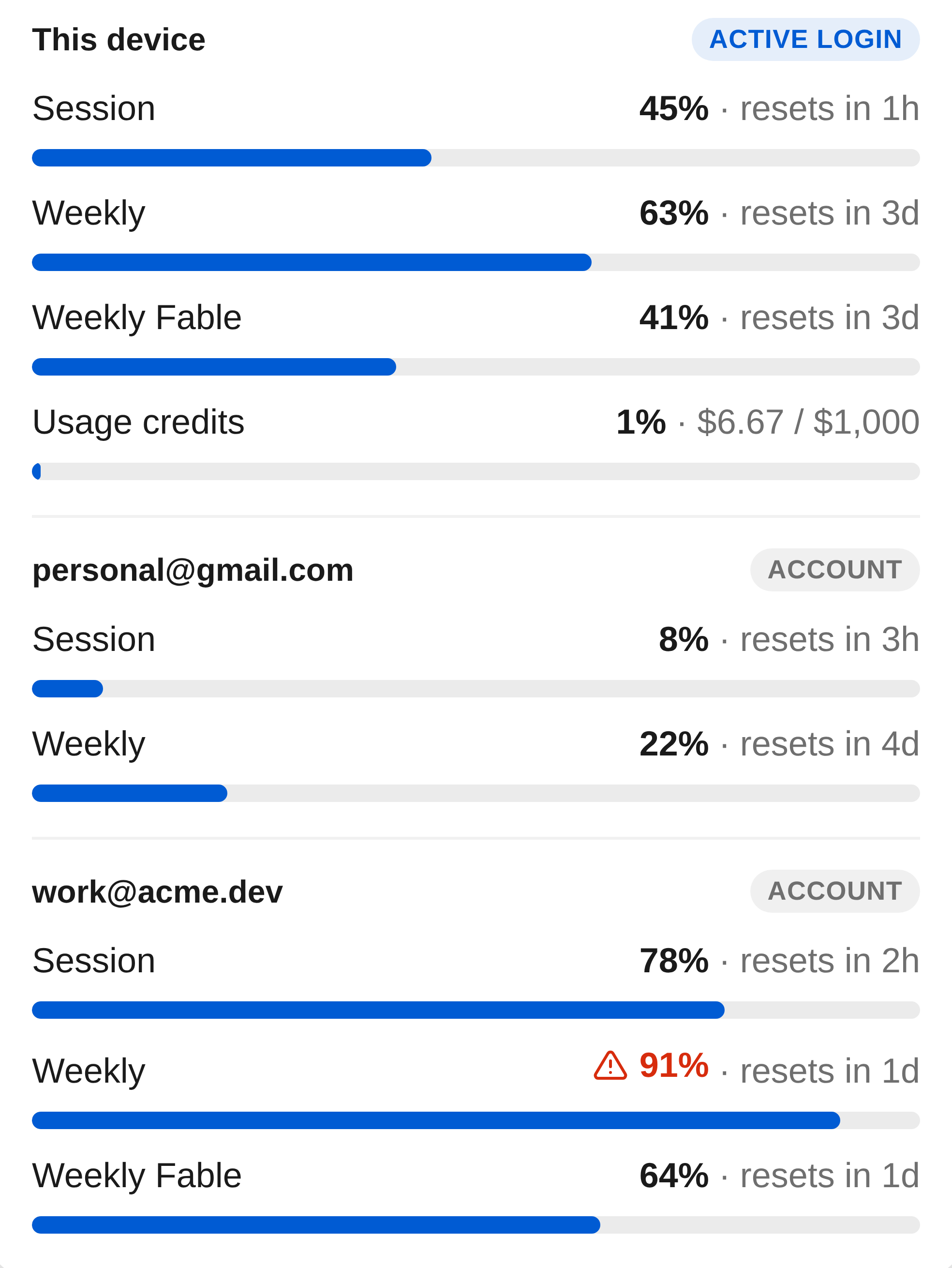
Your usage data never leaves your machine.
No accounts. No telemetry. No cloud storage. The only network calls are the quota checks to Anthropic, OpenAI, GitHub, Cursor and Google, using the logins you already have, plus the GitHub update check.
Your existing logins
Quota data comes from the tokens Claude Code, Codex, Copilot (editor plugin or gh CLI), Cursor and Gemini CLI already keep on disk. On macOS the Claude token lives in the Keychain, read via the security CLI after one “Always Allow” prompt. Nothing new to sign into, nothing to paste in, nothing leaves the machine.
Every network call, listed
Seven hosts. Quota checks go straight to each provider with your own session, and the update check hits GitHub Releases. That is the whole list.
Local log parsing
Cost is computed from the agent logs on your disk via tokscale. The logs stay where they are.
Zero telemetry
No analytics SDK, no crash reporter, no account. Nothing about you is collected, so nothing can leak.
Open source
MIT licensed. Read every line, or build the installer yourself.
$ npm install
$ npm run dist
✓ release/Agent Usage 0.1.4.exe
$ npm run dist:mac
✓ release/Agent Usage-0.1.4-arm64.dmg
Up and running in 30 seconds.
One download per platform, no admin rights. Windows updates itself from the tray; macOS shows a Download link when a new version is out.
Windows
Download for Windows- Windows 10 / 11 · x64
- Per-user install, no admin rights
- Updates itself from the tray
- Unsigned: SmartScreen shows “Unknown publisher” — choose More info → Run anyway
macOS
Download for macOS- macOS 12+ · Apple Silicon & Intel
- Drag to Applications, lives in the menu bar
- Shows a Download link when a new version is out
- Unsigned: Gatekeeper blocks the first launch — open System Settings → Privacy & Security → Open Anyway
Latest release MIT All releases Build from source